
Phone-Clone

Your phone, in more than one place

Every text, picture and call, kept for good.

A permanent, searchable copy of your Android phone on your own computer, plus the phone's screen in a window you can use. For your own phone, your parents' and your children's phones, and your company's phones.

  • Windows 10 and 11
  • Android 11 or newer
  • No card for the trial
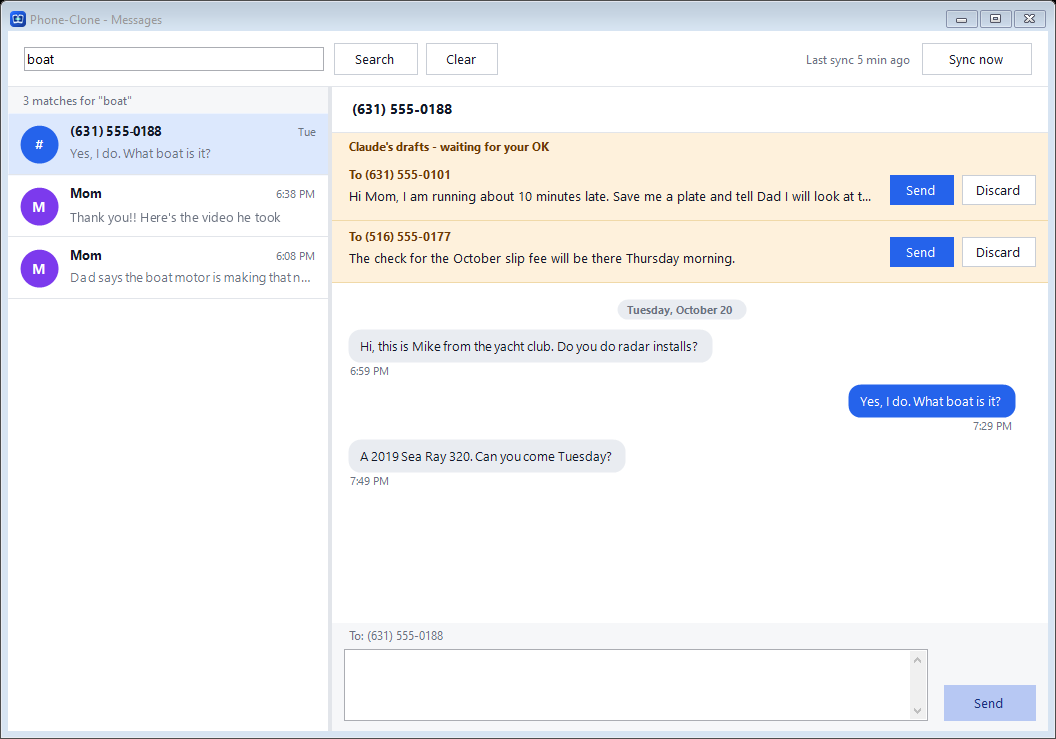
The Phone-Clone Messages window: a search for the word boat, the matching texts, and two replies Claude drafted waiting for an OK.
The real Messages window, filled with made-up sample texts.

Every record, forever. Every text, picture, call and contact it copies is kept, even after it's deleted on the phone.

Coming in 2.0 Several phones at once. 2, 5 or 10 phones, each in its own window.

Everything from your computer. See the phone, read, search and send with a real keyboard.

Coming later Claude works for you. Ask about any text or call, and have it draft replies for you to check.

Who uses Phone-Clone

One computer for everyone you look after

For anyone who needs a hand with technology, and for the day you leave your phone behind. It's the backup for every phone in your life.

Coming in 2.0 You're 45. Your parents are in their 70s. Your daughter just got her first phone.

Three phones, three generations, and you're the one everyone calls. Phone-Clone puts their phones on your computer: help Mom with her settings from your desk, look at a text that seems wrong when Dad asks, and help your daughter with hers. Everyone agrees, and in version 2.0 their phones show a Phone-Clone notice. Looking after family both ways, up and down.

  • Mom's phone
    Help from your computer, pictures kept for good
  • Dad's phone
    A second pair of eyes on texts that look wrong
  • Coming in 2.0 Your daughter's phone
    Help with her phone, and her texts and pictures kept
Looking after parents

  • Fix a setting or answer a text for them, from your computer
  • Look together at a text that seems wrong, like a fake "your account is locked" message
  • Doctor's instructions and appointment texts, kept once copied
  • Their pictures and texts kept for good

Coming in 2.0 Helping your children

  • Help with their phone and settings from your computer
  • Set up their phone together, and fix things from your computer
  • Their texts and pictures kept for good
  • For children under 18, on a phone you provide
  • Coming in 2.0 A Phone-Clone notice on their phone, so they know

Your own phone

  • Every text and call, kept forever on your computer
  • New or lost phone? Everything copied up to then is still on your computer
  • Ask Claude who called, what was said, what's coming up
  • Text with a real keyboard

Phone not within reach?

  • Phone in the other room? Don't get up: answer texts from the computer
  • Coming in 2.0 Left it at home? Your texts are on your computer at work
  • Reply to texts from your desk
  • Lost or broken phone: everything copied is still on your computer

Your business

  • Coming in 2.0 Several company phones in one place
  • Every customer text and call kept and searchable
  • Coming later Voicemail too
  • Company-owned phones, with your team told in writing

Why not just use the app that came with my computer?

Fair question. The phone app built into Windows, phone transfer programs and screen-mirroring apps each do part of the job. None of them keeps everything, on its own, for good.

The phone app built into WindowsPhone transfer and backup programsScreen-mirroring appsPhone-Clone
Keeps every text it copies, forever✗ Recent texts onlyOnly when you run a copy✗ No✓ Yes, copied every few minutes
A text deleted on the phone after it was copied✗ GoneSaved only if you copied it first✗ Gone✓ Still saved
Search years of texts✗ NoSome, in the copy you made✗ No✓ Yes, in seconds
See and use the phone's screenOn some phones✗ No✓ Yes✓ Yes
Several phones at onceOne at a timeOne at a timeSome, often technical or paid monthlyComing in 2.0 ✓ 2, 5 or 10, side by side
Ask Claude about your texts and calls✗ No✗ No✗ NoComing later ✓ Yes, and it drafts replies
PriceFreeFree to about $40Free, or a monthly feeFree for 30 days, then from $49 a year

We compare kinds of tools, not brands, using their own published information as of October 2026. Each does some things well: the app built into Windows is good for calls and photos, and mirroring apps are good at showing a screen.

How it works

Set it up once with the phone in front of you. After that it keeps copying on its own.

  1. 1

    Install it on your Windows computer

    A free download. Everything is unlocked for 30 days, no card and no account.

  2. 2

    Connect the phone, with its owner

    Plug it in with its own cable. Setup records whose phone it is and the owner's agreement. In version 2.0, a notice is posted on that phone.

  3. 3

    Everything is kept, and searchable

    Over home Wi-Fi it copies every few minutes. Search years of texts in seconds.

What it does

Kept for good

Every text, picture message and Google Messages chat, plus call history and contacts. Lost, broken or replaced phone? Everything copied is still there.

Search years in seconds

Find the invoice, the address or the photo from three years ago.

The phone on your screen

The phone's screen in a window on your computer, used with your mouse and keyboard.

Send from the computer

Type and send texts with a real keyboard.

Coming in 2.0 Several phones at once

Two, five or ten phones depending on your plan, each in its own window, side by side.

Coming in 2.0 The phone's own files

Photos, videos, recordings and documents, copied and kept the same way.

Claude, working for you

Coming later Just ask your computer

Because every text and call is on your computer, Claude can answer questions about them in plain words, and draft replies for you to check and send.

  • Who called, and when
  • What someone texted, even years ago
  • Which appointments came up this week
  • Write the reply or the follow-up text
  • Coming later Check the texts against your email and voicemail

Optional, for your own phone, and off until you turn it on. It uses your own Claude account from Anthropic, and everything it reads to answer you goes to Anthropic.

Who called me Tuesday afternoon?

Two calls: Rivera Plumbing at 2:14 PM (4 minutes) and Mom at 4:40 PM (missed). Rivera texted after: "Sent the estimate, $1,850."

What did Dr. Patel's office say about Mom's appointment?

They moved it to Thursday the 29th at 10:30 AM, and asked her to bring her medication list.

Text Mom that I'll drive her.

Draft, waiting for you to check: "Hi Mom, I'll pick you up Thursday at 10 for Dr. Patel. Bring your medication list."

Example with made-up people and messages.

See it working

These are the real Phone-Clone windows, filled with made-up sample texts. A short video is coming with version 2.0.

Messages window searching for boat, with Claude's drafted replies waiting for an OK.
Search every text Phone-Clone has copied. Drafted replies sit on top for you to check.
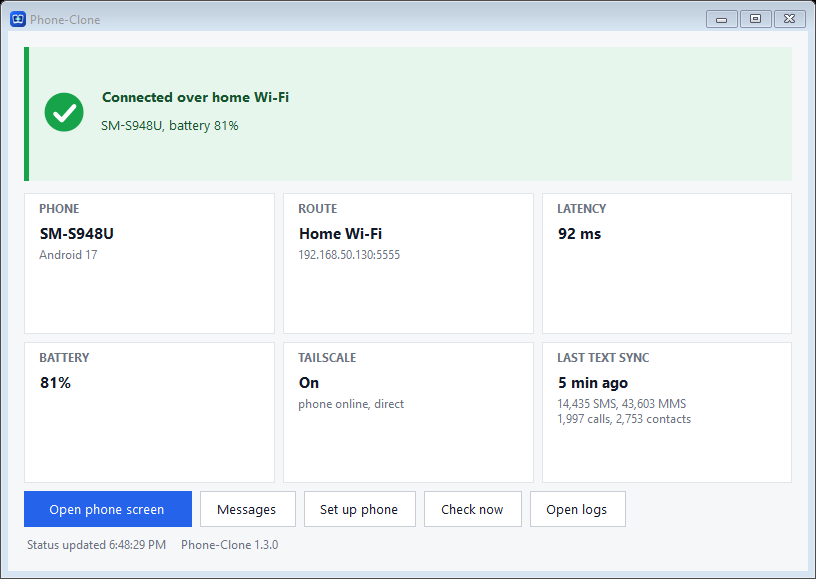
Phone-Clone main window: connected over home Wi-Fi, battery 81 percent, last text copy 5 minutes ago, and an Open phone screen button.
Your phone at a glance. Connected over home Wi-Fi, copied 5 minutes ago. One click opens the phone's screen.

A record when it matters

Who said what, and when

You called the phone company about a wrong charge. You texted them. You called again. Two months later it still isn't fixed, and they say there's no record. You have one: every call and text Phone-Clone copied, with its date and time, kept for good.

Ask Claude to put the whole story in order. Just as useful for a contractor who didn't finish, an insurance claim, or a conversation with your lawyer.

  • Texts kept even after they're deleted on the phone
  • Call history: who, when and how long
  • Coming in 2.0 Export a whole conversation
  • Pictures and videos sent in texts
  • Coming later Line it up with your emails
  • Coming in 2.0 Call recordings saved on the phone

The wrong charge, in order

  1. Mar 3Call to the phone company, 18 minutes
  2. Mar 3Text from them: "Your ticket 48213 is open. Credit in 1 to 2 bills."
  3. Apr 6Your text: "The charge is still on this bill."
  4. Apr 9Call to the phone company, 34 minutes
  5. May 7Still on the bill. Your record shows every step.

Example with made-up dates and messages.

Your phone, or with their agreement

  • Setup records whose phone it is and the owner's agreement.
  • Coming in 2.0 A Phone-Clone notice is posted on that phone.
  • Coming in 2.0 The owner confirms on the phone itself.
  • Coming in 2.0 On anyone else's phone, the notice comes back if it's swiped away.
  • For your own phone, a parent's phone when your parent agrees, your child's phone while they're under 18, and phones your business owns.
  • It isn't for employees' personal phones, a spouse's or partner's phone, or any adult who hasn't agreed.

Where your copy lives

  • Everything stays on your computer. Nothing is uploaded to us.
  • Coming in 2.0 Checking for updates sends nothing about you.
  • The assistant is off until you turn it on. It uses your own Claude account from Anthropic, and everything it reads to answer you goes to Anthropic.

Read the privacy policy

Simple pricing

Free for 30 days, no card. Then pick a plan by how many phones.

See full pricing

Personal
Up to 2 phones

$49 a year

Family / Small business
Up to 5 phones

$99 a year

Business
Up to 10 phones

$199 a year

Questions

Why is it called Phone-Clone?

Because it puts your phone in more than one place: the phone in your pocket, and a full working copy on your computer, with every text and call it ever had.

Does it work with an iPhone?

No. Phone-Clone works with Android phones only.

Does it work on a Mac?

Not yet. It runs on Windows 10 and 11.

Does it upload my texts anywhere?

No. Your copy stays on your own computer. We never receive your texts, calls, contacts or pictures.

Is this the Huawei app with a similar name?

Phone-Clone for Windows isn't Huawei's Phone Clone app and has nothing to do with Huawei. To move your things to a new Huawei phone, use Huawei's own free app.

When can I get it?

Phone-Clone 2.0 is being finished. Leave your email below and we'll send you the download link the day the free trial opens.

Get the download link the day it opens

One confirmation now, then one email the day it opens. We delete the list 60 days after that.

See the privacy policy and the terms.